Friday, July 13, 2012

Integrate Excel with OutLook

Most of the times, we have certain appointments but we failed to remember in day to day life. How good will it be if we open our mail box and got all entries in calendar of outlook.

I've a list of  due dates of investment which I generally forget to remember. Initially I use excel to maintain same but again same problem. Same day alert will be more beneficial. I used following way to sharp my memory.

1.  You don't need many fields to get started, just try the following for a basic import of all day appointments:
Cell A1: Subject
Cell B1: Start Date

Now add the data you like to import into your Outlook calendar under each of these column headings, for example: cell A2 could be "My B'day" and cell B2 could be "27/07/1982"

2. Most Import step: Select a range of data and name it. Give this range a name under InsertNameDefine (or just type into the Name Box just above the top of column A). Outlook needs this range name so it knows where to find the data to import. Save your Excel file in Excel 97-2003 format and close it.

3. Now, Go to Outlook, Select File-> Import


4.In the Import And Export wizard, select Import from another program or file option and hit Next.


5.  Under File Type, select Microsoft Excel and hit Next.


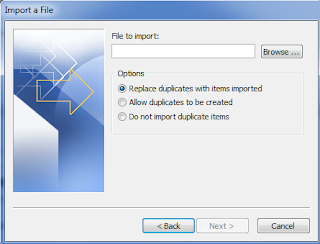
6. Now choose the file to import


7. Select destination folder of Outlook.


Now click finish and check calendar.. You can see all appointments as alert and best things.. no coding.. only reuse :)

Monday, January 17, 2011

DRY principle..

Don't repeat Yourself... :D

http://en.wikipedia.org/wiki/Don%27t_repeat_yourself

Dependency Injection..

Just saw a new link related to Dependency Injection.. Really good explanation..

http://en.wikipedia.org/wiki/Dependency_injection

http://msdn.microsoft.com/en-us/library/ff647391.aspx

Sunday, July 13, 2008

Free Books Online

If you want to download free e-books, please visit this URL.

ftp://ftp.uar.net/pub/e-books/

http://www.esnips.com/

it will give you a series of old/new all the books of software developement.


-Tarun

IL Assembly Language


This article teaches the basics of IL Assembly language which can be used to debug your .NET code (written in any .NET high level language) at low level. From low level, I meant the point where the compiler of your high level language has finished his work. Also, using these basics, you can plan to write your own compiler for a new .NET language.

Whenever you complier your code in .NET, regardless the language you choose, it is converted to Intermediate Language (IL) which is also known as Microsoft Intermediate Language or Common Intermediate Language. You can think the IL as that the Byte Code generated by the Java Language. If you are interested to understand that how .NET deals with data types, and how the code you wrote is converted to IL code etc, then knowledge of IL will give you great advantages. These advantages may include understanding that what the code .NET compiler emits. Hence, if you know the IL, then you can examine the code emitted by the complier and make necessary changes (though not needed in most cases). You can change the IL code to make necessary changes (which your high level language may not allow) to increase the performance of you code. This also may help you to debug your code at low level. And also, if you are planning to write a compiler for .NET, then it is necessary to understand the IL.

IL itself is in the binary format which means it can't be read by the human. But as other binary (executable) code have an assembly language, so the same way IL also has an assembly language known as IL Assembly (ILAsm). IL Assembly has the instruction in the same way as that the native assembly language have. Like, to add two numbers, you have add instruction, to subtract two numbers, you have sub instruction etc. It is obvious that .NET runtime (JIT) can not execute the ILAsm directly. If you have written some code in ILAsm then first you have to compile that to IL code and then JIT will take care of running this IL code.

NOTE: Please note that IL and IL assembly are two different things. Whenever we talk about IL, then it means the binary code emitted by the .NET compiler whereas ILAsm will refer to the IL assembly language which is not in binary form.

NOTE: Please note that I am expecting that you are very much familiar with .NET (including any high level language). In this article, I will not go into details of everything but only those which I think are needed to be explained. If something confuse you, then you can contact me for more discussion.


Reference: http://www.codeproject.com/Articles/3778/Introduction-to-IL-Assembly-Language